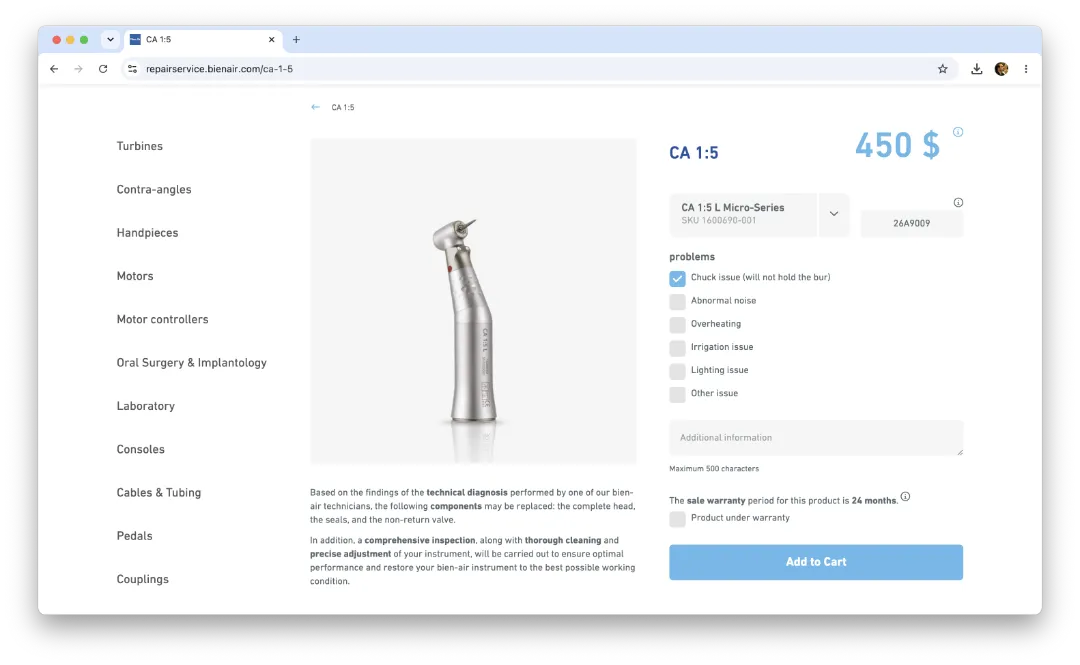
If this is your first time using the new Bien-Air repair service website and you are an existing customer, you may have received an email with login instructions and a temporary password. Since these emails are easy to miss, we recommend checking your inbox, spam, or junk folder before creating a new request.
Look for an email from Bien-Air with your temporary password and login instructions.
If you do not see the email in your inbox, check your spam or junk folder. It may have been filtered automatically.
If you cannot find your temporary password, contact our repair team and we can help you access your account.
Our new repair process is designed to make service easier for you and your practice. Instead of waiting for estimates and approvals, Bien-Air’s flat-rate repair model helps simplify cost expectations, reduce delays, and get your equipment moving through service more efficiently.
One flat fee helps remove the guesswork from repair costs and makes it easier to plan, approve, and repair.
A simpler process means fewer steps, fewer delays, and less time spent tracking approvals or waiting on the next action.
With repair requests submitted online and pricing simplified, your equipment can move through the repair process more efficiently.
The new Repair Service gives you one place to submit your request, provide your product details, and get your equipment in for repair, quickly.
Visit Bien-Air Repair Service to begin your request. Enter your contact information, product details, and a short description of the issue.
Follow the repair service instructions to send in your handpiece/motor. You can schedule a time for UPS to pick it up, or if you prefer, you can drop it off.
Once received, your equipment is handled by the repair team and returned after service, helping your practice get back to work with less disruption.
Please include as much detail as possible when submitting your repair request so the repair team can service your equipment efficiently.